Integrations

Merchant onboarding, invoice issuance, embedded checkout, and admin tools. Everything a PriceEdge integration needs in one place.

Use these endpoints to onboard merchants, issue invoices, render the consumer payment experience, manage membership state, and debug funding operations.

Sample Application

A minimal server-plus-checkout integration.

Start here if you want the fastest path to a working PriceEdge integration. Your server creates the invoice, your frontend renders the button, and the shopper opens PriceEdge from checkout.

server.js

Keep the PriceEdge API key on the server. Create a fresh invoice whenever the order total changes, then return the resulting invoice details to the browser.

const PE = "https://priceedge.me/api/invoice"
const key = process.env.PRICEEDGE_API_KEY

const headers = {
  "content-type": "application/json",
  authorization: `Bearer ${key}`
}
const body = {
  "invoice-nbr": order.id,
  amt: order.total.toFixed(2)
}
const response = await fetch(PE, {
  method: "POST",
  headers,
  body: JSON.stringify(body)
})

const invoice = await response.json()

return {
  invoiceNumber: invoice["invoice-nbr"],
  amount: order.total.toFixed(2)
}
checkout.html

Pass the server-created invoice into the button as attributes if you want the lightest possible integration.

<head>
  <script src="https://priceedge.me/checkout.js"></script>
</head>

<body>
  <button
    id="PriceEdge"
    data-invoice="INV-2048"
    data-amount="29.00"
  ></button>
</body>

checkout.js

If your browser app already has invoice data in memory, bind the button yourself and call the library directly.

const invoice = window.__PRICEEDGE_INVOICE__
const button = document.getElementById("PriceEdge")

button.addEventListener("click", () => {
  window.PriceEdge.open({
    invoiceNumber: invoice.invoiceNumber,
    amount: invoice.amount
  })
})

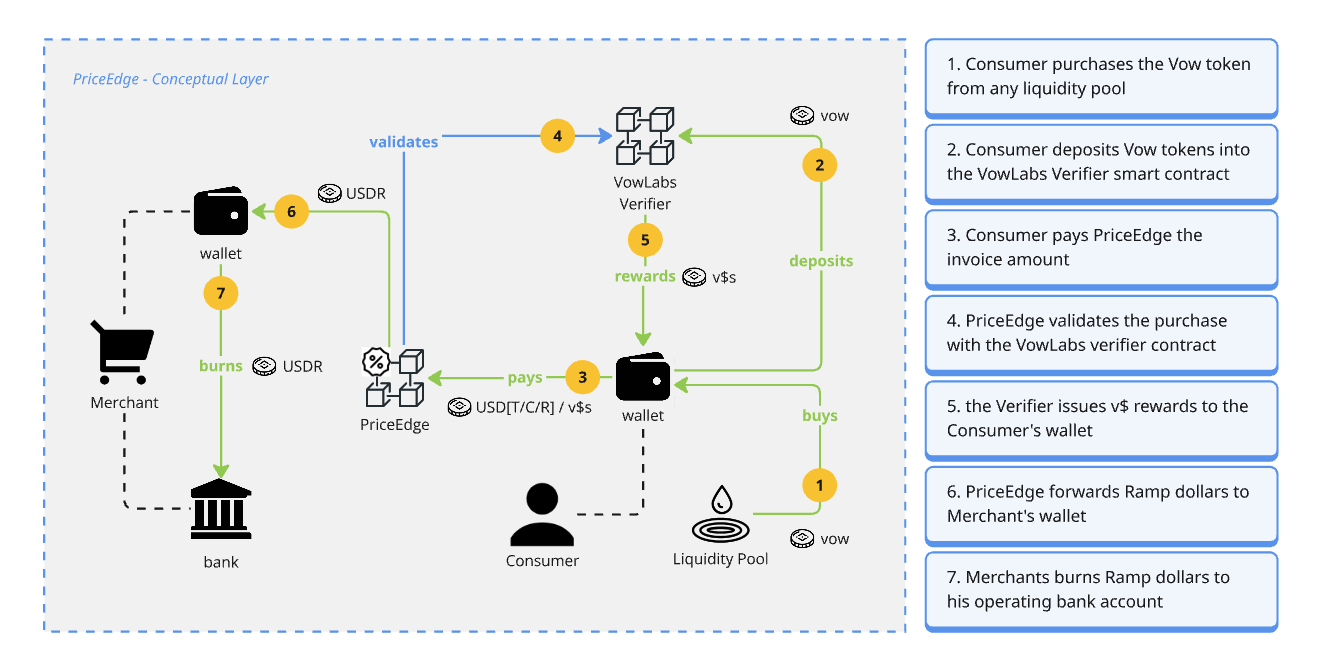
To understand how the magic happens, here's the complete payment flow at a conceptual level, from how the consumer acquires and stakes VOW, to how PriceEdge interacts with the Vow ecosystem to generate consumer rewards, how the merchant gets paid, and ultimately burns payment to the bank.

Conceptual PriceEdge flow showing the consumer buying VOW, staking with the verifier, paying PriceEdge, receiving v$ rewards, and the merchant settling through USDR to the bank.

The API key stays on your server. If your cart changes, create a fresh invoice server-side and either update the button data attributes or the invoice object used by your click handler. The shopper picks the discount inside the PriceEdge checkout itself.

Overview

What the API covers

The PriceEdge API has two main surfaces: merchant onboarding and invoice operations. Merchant signup proves wallet ownership and issues a merchant API key. Invoice routes then create receipt addresses, render the customer payment flow, and keep discount settings in sync with checkout.

Health

GET /healthz returns basic liveliness. GET /readyz reports whether PriceEdge has loaded its required config and service dependencies.

Merchant onboarding

POST /api/signup/challenge issues a wallet-signing challenge and POST /api/signup creates the merchant record and API credentials.

Checkout

POST /api/invoice, POST /invoice-html, GET /payment, and POST /api/invoice-discount-rate drive the customer payment experience.

Merchant Onboarding

Merchant signup is a wallet-proven flow.

The frontend first asks PriceEdge for a short-lived challenge, then the merchant signs it with their settlement wallet and submits the business profile in a second request.

POST

/api/signup/challenge

Creates a wallet-signing challenge tied to the merchant settlement wallet.

{
  "wallet-address": "0xMerchantSettlementAddress"
}
{
  "status": "ok",
  "challenge-id": "ch_...",
  "message": "PriceEdge merchant signup\nWallet: 0x...\nNonce: ...",
  "expires-at": "2026-03-25T20:30:00.000Z"
}
POST

/api/signup

Creates the merchant, stores a callback target, and returns credentials once.

{
  "business-name": "Atlas Commerce",
  "contact-name": "Jordan Lee",
  "contact-email": "merchant@brand.com",
  "website": "https://brand.com",
  "country": "United States",
  "monthly-volume": "5,000 - 25,000 orders",
  "settlement-address": "0xMerchantSettlementAddress",
  "callback": "https://merchant.example/priceedge/callback",
  "challenge-id": "ch_...",
  "wallet-signature": "0x...",
  "preferred-rails": ["credit-cards", "stablecoins"]
}
{
  "status": "ok",
  "merchant-id": "m_...",
  "api-key": "pe_live_...",
  "callback-signing-secret": "..."
}

Invoices

Issue invoices, render checkout, and sync discount settings.

Invoice endpoints require the merchant API key. PriceEdge returns either a receipt address for a headless integration or a rendered HTML customer payment experience.

POST

/api/invoice

Creates the invoice and returns the PriceEdge invoice record plus the derived receipt address.

authorization: Bearer pe_live_...
{
  "invoice-nbr": "INV-1001",
  "amt": "10.00"
}

Use your own merchant order ID in invoice-nbr or let your app map that field to the order record you created server-side.

POST

/invoice-html

Creates an invoice and returns a complete hosted checkout page for that invoice.

authorization: Bearer pe_live_...
{
  "invoice-nbr": "INV-1001",
  "amt": "10.00",
  "discount-rate": 10
}

discount-rate is optional and defaults to 10.

GET

/payment

Renders the customer payment experience used by the embedded overlay and hosted preview flows.

/payment?invoice=INV-1001&amount=10.00

This route is what checkout.js loads inside the floating overlay after the shopper clicks the PriceEdge button.

Response

/api/invoice example

{
  "status": "ok",
  "invoice-nbr": "INV-1001",
  "receipt-addr": "0xDerivedReceiptAddress"
}
POST

/api/invoice-discount-rate

Updates the desired discount rate while the customer is on the payment page.

{
  "invoice-nbr": "INV-1001",
  "discount-rate": 15,
  "page-token": "..."
}

Checkout currently enforces a minimum of 5%, a maximum of 100%, and a default of 10%.

Callbacks And Checkout

What vendors must support after payment.

Each vendor must operate a server endpoint at the callback URL submitted during signup. PriceEdge calls that endpoint when an invoice payment is observed or when the observed amount does not match the invoice.

Required vendor endpoint

POST https://merchant.example/priceedge/callback
content-type: application/json

The endpoint should be public over HTTPS, accept JSON, finish quickly, and return any 2xx status once the notification is safely recorded. Non-2xx responses or network failures are marked failed and retried by PriceEdge until the callback is sent.

Payment notification payload

{
  "invoice-nbr": "INV-1001",
  "status": ""
}

An empty status means PriceEdge observed the expected payment amount and the invoice is paid. A non-empty status contains the mismatch or processing note the vendor should review before fulfillment.

Callback headers

x-priceedge-merchant-id: m_...
x-priceedge-timestamp: 2026-03-25T20:35:00.000Z
x-priceedge-signature: <hex hmac sha256 of `${timestamp}.${raw_json_body}`>

Vendors verify x-priceedge-signature with the callback signing secret returned at signup. Compute the HMAC over the exact raw JSON body bytes received, prefixed by the timestamp and a period.

Vendor handling checklist

  • Verify x-priceedge-merchant-id matches the expected merchant.
  • Reject stale x-priceedge-timestamp values according to your replay policy.
  • Verify the HMAC before trusting the body.
  • Use invoice-nbr to update the matching order or invoice record.
  • Treat callbacks as idempotent because PriceEdge may retry after failures.

Admin And Support

Membership and funding operations.

These routes are operational surfaces for PriceEdge-hosted flows and internal support tooling.

GET

/api/membership

Checks whether a wallet has already accepted the club membership agreement.

POST

/api/membership

Records membership acceptance for the connected wallet.

GET

/api/funding-account

Returns any stored funding-account details for the wallet connected to checkout.

GET

/api/admin/memberships

Lists stored club memberships. Protected by PRICEEDGE_ADMIN_KEY.

DELETE

/api/admin/memberships/:wallet

Deletes a stored membership record for support or testing purposes.

POST

/api/admin/funding-account/mint-chain

Updates the chain family used for future funding mints for a stored wallet.

Quick Start

Minimal merchant flow

1. Get a challenge. 2. Sign it with the merchant settlement wallet. 3. Submit signup. 4. Store the API key and callback signing secret. 5. Call POST /api/invoice. 6. Render the button and load checkout.js so the shopper can open PriceEdge.

For the lightest implementation path, keep the API key server-side and either use /invoice-html for a full hosted page or pass the created invoice into the checkout.js button integration.

Sign Up Today